Embed Modern Web Apps Inside VBA
Without COM Registration
The IE control is dead. Microsoft's replacement is intentionally minimal.
Access 365 Edge Browser Control (Microsoft) gives VBA developers 4 methods and 3 events. LiteView2 gives you 200+ methods, 40+ events, full DOM, JSON engine, and a real JS bridge — and works in Excel and VB6 too, not just Access 365.
Access 365 Edge Browser Control (Microsoft) is a viewer. LiteView2 is a development platform built for VBA.
If you're building anything beyond displaying a webpage, you'll quickly hit the limits of Access 365 Edge Browser Control (Microsoft).
⚡ No installation · Works instantly · Windows 32/64-bit
Designed for professional VBA developers working with Excel, Access, and legacy systems.

ActiveX and COM specialist focused on high-performance controls for Excel and Access VBA. Used in real-world VBA applications and production environments.
What VBA Developers Actually Hit
Real workflow problems that Access 365 Edge Browser Control (Microsoft) cannot solve.
❌ Edge: Cannot access DOM — .Object.Document is gone
✓ LiteView2: 28 DOM functions — read, write, query any element
❌ Edge: No callback system. ExecuteJavascript exists — but no structured return, no callbacks, no DOM integration, no usable result handling
✓ LiteView2: Full bidirectional bridge — JS calls VBA, VBA calls JS, with return values
❌ Edge: User-driven navigation only — no network hooks, no request interception, no silent automation
✓ LiteView2: Full automation platform — navigation control, request interception, silent operation
❌ Edge: Locked to Access 365, tied to Microsoft environment — breaks if client has wrong Office version
✓ LiteView2: Works anywhere VBA runs — Excel, Access, VB6 — deploy with your app, no dependency lock-in
⚠ Looks like it should work — but doesn't
Microsoft exposes ExecuteJavascript — but without callbacks, structured return values,
or DOM access, it cannot be used for real automation. The method exists. The capability doesn't.
Access 365 Edge Browser Control (Microsoft) is a viewer. LiteView2 is a development platform.
IE WebBrowser vs Access 365 Edge Browser Control (Microsoft) vs LiteView2
Access 365 Edge Browser Control (Microsoft) solves rendering. LiteView2 solves development.
❌ IE WebBrowser
⚠ Access 365 Edge Browser Control (Microsoft) (Access 365)
✅ LiteView2
"Access 365 Edge Browser Control (Microsoft) is a step forward in rendering. It's a step backward in developer control."
⚡ No installation · Works instantly · Windows 32/64-bit
What You Can Actually Build
A direct comparison of what each control can do in real VBA projects.
| Task | Access 365 Edge Browser Control (Microsoft) | LiteView2 |
|---|---|---|
| Display a webpage | ✓ | ✓ |
| Scrape / read page data | ✗ | ✓ |
| Automate login flows | ✗ | ✓ |
| Run JS and get result in VBA | ✗ no callbacks | ✓ |
| Send data from JS to VBA | ✗ | ✓ |
| Capture PDF or screenshot | ✗ | ✓ |
| Manage file downloads | ✗ | ✓ |
| Build embedded web app in VBA | ✗ | ✓ |
| Intercept / modify requests | ✗ | ✓ |
| Use in Excel or VB6 | ✗ Access-only | ✓ |
| Deploy without MS365 | ✗ | ✓ |
| Build reliable production automation tools | ✗ | ✓ |
See LiteView2 in Action
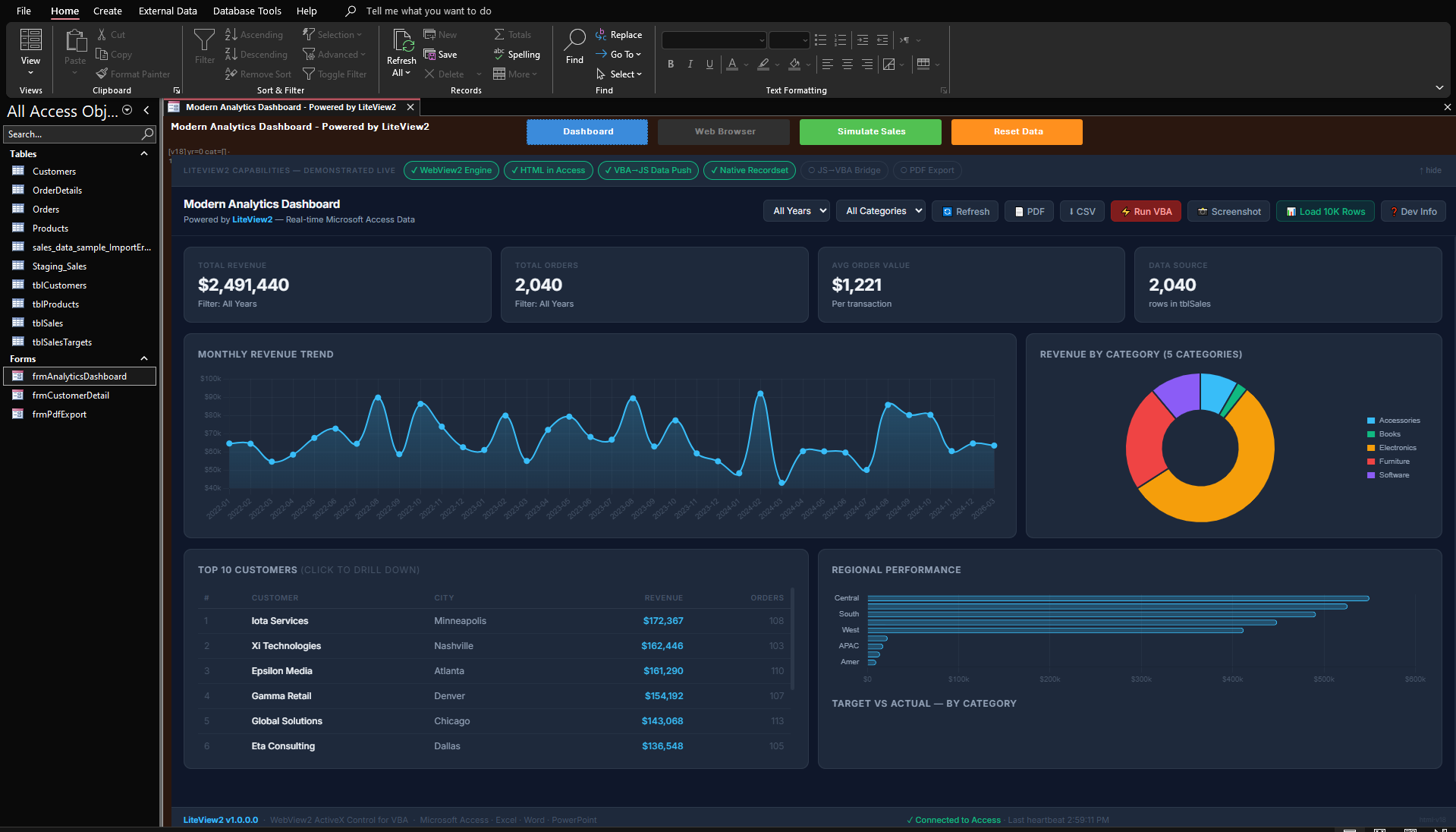
A real Access form running a Chromium dashboard — powered by LiteView2.
Built for VBA Developers
Everything you need to embed modern web content in your VBA applications.
Registration-Free Deployment
Copy the OCX next to your app and add a small bootstrap module. No regsvr32, no admin rights, no registry entries.
Full Chromium Engine (WebView2)
Every modern website works. Full HTML5, CSS3, ES6+ JavaScript. Active security updates from Microsoft.
VBA ↔ JavaScript Bridge
Call VBA from JavaScript. Control the DOM from VBA. Full two-way communication with PostMessage, callbacks, and host objects.
Built-in JSON Support
Parse, query, validate, and build JSON natively in VBA. No external libraries required.
Works in Excel & Access
Embed in UserForms, Access forms, VB6, Delphi — any COM host. Push DAO recordsets directly to charts.
60+ Events
Navigation, DOM, downloads, frames, audio, focus, authentication, permissions, process lifecycle — full control.
⚡ No installation · Works instantly · Windows 32/64-bit
Start in Minutes — Not Hours
Initialize once, then control everything from VBA.
' Get the singleton pool and embed a browser in a Frame control
Dim lv As Object
Set lv = GetPool()
idx = lv.CreateInControl("https://example.com", Me.Frame1)

' Execute JavaScript and get the result back in VBA
Dim title As String
title = lv.ExecuteScript(idx, "document.title")
MsgBox "Page title: " & title
' Open a recordset from your Access database
Dim rs As DAO.Recordset
Set rs = CurrentDb.OpenRecordset("SELECT Period, Revenue FROM Sales")

' Send it to the browser — serialized as JSON, received by JavaScript
lv.PushRecordset idx, rs, "renderChart"
rs.Close
Built for Real VBA Applications
What developers are building with LiteView2.
Go Beyond Access 365 Edge Browser Control (Microsoft)
Microsoft's built-in Edge control gives you 4 methods and 3 events — enough to show a page, not enough to build with it. LiteView2 gives you 200+ methods, a real JS bridge, full DOM access, and deployment freedom. Built specifically for VBA developers — works in Excel and VB6 too, not just Access 365.
Embed ChatGPT or Any Website
Load any URL — Google Maps, ChatGPT, internal portals — right inside your Access or Excel forms.
Build Real-Time Dashboards
Push DAO recordset data directly to Chart.js, D3, or Plotly charts. No file exports, no middleware.
Run JavaScript from VBA
Two-way communication: VBA calls JS functions, JS sends data back to VBA. Full bidirectional bridge.
⚡ No installation · Works instantly · Windows 32/64-bit
How Deployment Works
Copy LiteView2 files with your project
Place the OCX next to your .accdb or .xlsm file.
Add the bootstrap module
A small VBA module activates the OCX for registration-free use.
Run inside Excel or Access
Create browsers, navigate, execute JavaScript — all from VBA.
No installation. No admin rights required.
Built for real-world VBA automation — not just embedding web pages.
Download LiteView2 and Modernize Your VBA Apps in 5 Minutes
Full trial package. 30 days. All features. No credit card.
Enterprise inquiry or demo request? Fill out the form below:
Built for performance and stability — not a wrapper or shim. Every method is a production-grade implementation with full error handling, designed specifically for VBA developers.
Created by Muhammad Imran — a developer who builds production Access and Excel applications for enterprise clients and needed a real WebView2 control that didn't exist.
The WebView2 Control That Access Should Have Built
IE WebBrowser vs Access 365 Edge Browser Control (Microsoft) vs LiteView2
Microsoft's built-in Edge control solves rendering. LiteView2 solves development.
| Feature | IE WebBrowser | Access 365 Edge Browser Control (Microsoft) | LiteView2 |
|---|---|---|---|
| Modern HTML5 & CSS3 | ✗ | ✓ | ✓ |
| Browser Methods | Many (via .Object) | 4 only | 200+ |
| Browser Events | Many | 3 only | 40+ |
| DOM Access | ✓ MSHTML | ✗ | ✓ 28 functions |
| JS → VBA Communication | ✗ | ✗ no WebMessageReceived | ✓ |
| JS Return Values / Callbacks | Limited | ✗ fire-and-forget only | ✓ |
| Navigation Lifecycle Hooks | ✗ | ✗ | ✓ |
| Network Layer Access | ✗ | ✗ | ✓ |
| DevTools / Debug Hooks | ✗ | ✗ | ✓ |
| Built-in JSON Support | ✗ | ✗ | ✓ |
| Download Management | ✗ | ✗ | ✓ |
| Print to PDF | ✗ | ✗ | ✓ |
| Screenshot Capture | ✗ | ✗ | ✓ |
| Multi-Browser Instances | ✗ | ✗ | ✓ |
| Profile / Session Isolation | ✗ | ✗ | ✓ |
| Cookie & Cache Control | ✓ | ✗ | ✓ |
| Proxy Support | Limited | ✗ | ✓ |
| Works in Excel / VB6 | ✓ | ✗ Access-only | ✓ |
| Registration-Free Deployment | ✗ | ✗ | ✓ |
| Requires MS365 | No | Yes — locked-in | No |
| Works Offline / Legacy Env | ✓ | ✗ | ✓ |
| Works Regardless of Office Version | ✓ | ✗ breaks with wrong version | ✓ |
| Active Development | ✗ dead | Minimal | ✓ |
| Practical Usability | Full | Severely limited | Full |
Designed for developers who need control — not just rendering.
Microsoft solved rendering.
LiteView2 solves what developers actually need.
Get Started in 3 Steps
No installers. No configuration files. No registry entries.
Copy OCX to your folder
Place the OCX file next to your .accdb or .xlsm. That's the entire install.
Add the bootstrap module
Paste a small standard module (included below). It activates the control from VBA.
Load any website
Create a browser in any Frame control. Navigate, execute JavaScript, and handle events from VBA.
lv.CreateInControl "https://example.com", Me.Frame1
⚡ No installation · Works instantly · Windows 32/64-bit
Full Bootstrap Module
Copy this standard module once per project — it handles all RegFree initialization.
' --- LiteView2 Reg-Free Bootstrap ---
' OCX must be in the same folder as your .accdb / .xlsm

#If Win64 Then
    Private Declare PtrSafe Function SetDllDirectory Lib "kernel32" _
        Alias "SetDllDirectoryW" (ByVal lpPathName As LongPtr) As Long
    Private Declare PtrSafe Function LiteView2_ActivateManifest _
        Lib "LiteView2_x64.ocx" (ByVal path As LongPtr) As Long
    Private Declare PtrSafe Function LiteView2_CreateBrowserPool _
        Lib "LiteView2_x64.ocx" () As Object
#Else
    Private Declare PtrSafe Function SetDllDirectory Lib "kernel32" _
        Alias "SetDllDirectoryW" (ByVal lpPathName As LongPtr) As Long
    Private Declare PtrSafe Function LiteView2_ActivateManifest _
        Lib "LiteView2_x86.ocx" (ByVal path As LongPtr) As Long
    Private Declare PtrSafe Function LiteView2_CreateBrowserPool _
        Lib "LiteView2_x86.ocx" () As Object
#End If

Private m_Pool As Object

Public Function GetPool() As Object
    If m_Pool Is Nothing Then
        Dim p As String
        p = CurrentProject.Path          ' Access  (Excel: ThisWorkbook.Path)
        SetDllDirectory StrPtr(p)       ' Tell Windows where the OCX lives
        #If Win64 Then
            LiteView2_ActivateManifest StrPtr(p & "\LiteView2_x64.ocx")
        #Else
            LiteView2_ActivateManifest StrPtr(p & "\LiteView2_x86.ocx")
        #End If
        Set m_Pool = LiteView2_CreateBrowserPool()
        m_Pool.ActivateLicense "Your Company", "YOUR-LICENSE-KEY"  ' omit this line during 30-day trial
    End If
    Set GetPool = m_Pool
End Function
Two Ways to Deploy. Zero Headaches.
Most VBA controls require admin rights and registry entries. LiteView2 works without either — but supports both models when you need them.
Registration-Free Mode
Drop the OCX file next to your application. No regsvr32,
no admin rights, no registry entries. Your app runs on any machine with the WebView2 Runtime.
How it works: Add a small bootstrap module (included above) that calls two functions from the OCX — one to set the folder path, one to activate the control. After that, create browsers and use them from any form. Everything is handled internally — no manual configuration needed.
- ✓ No COM registration required
- ✓ No administrator permissions needed
- ✓ XCopy / USB / network share deployment
- ✓ Multiple versions can coexist on one machine
- ✓ Perfect for consultants distributing to clients
Registered (COM) Mode
Standard COM registration using regsvr32.
Install once, use from any application on the machine. Early binding and IntelliSense in the VBA
editor.
- ✓ System-wide registration for all applications
- ✓ Full IntelliSense and early binding in VBA
- ✓ Centralized IT deployment via Group Policy
- ✓ Familiar workflow for Windows sysadmins
- ✓ Type library (.tlb) included for IDE support
Access 365 Edge Browser Control (Microsoft) vs LiteView2 — Deployment Reality
Access 365 Edge Browser Control (Microsoft)
✗ Requires Access 365
✗ Breaks if wrong Office version
✗ Tied to Microsoft update cycle
✗ No redistribution control
✗ Cannot be redistributed independently
LiteView2
✓ Works in any VBA host
✓ Works regardless of Office version
✓ Fully offline capable
✓ Royalty-free redistribution
✓ Deploy with your project
With Microsoft's control, you depend on their environment. With LiteView2, you control yours.
Complete Feature Reference
A complete Chromium integration layer — not a wrapper, not a shim. Real APIs that do real work.
Navigation & Content
Load Any URL or HTML String
Navigate, NavigateSync, NavigateToString, history, custom HTTP requests with headers and POST data.
Read & Manipulate Web Pages From VBA
Read, write, click, check, select, scroll, focus — by ID, by name, by CSS selector. No JavaScript required.
Run JavaScript and Get Results Back
Sync and async JavaScript. Typed arguments. Return values. Persistent document-creation scripts.
Preview PDFs, Office Files & Media
Open images, PDFs, videos, audio, Word, Excel, and PowerPoint files directly in the browser frame.
Data & Communication
Two-Way VBA-to-JavaScript Bridge
PostMessage, WebMessageCallback, and Host Object Bridge. VBA ↔ JavaScript in both directions.
Send Database Records to Charts Directly
Serialize DAO or ADO recordsets directly to the browser. One call: VBA → JSON → JavaScript callback.
Parse & Build JSON Without External Libraries
Parse, query, validate, build JSON natively. No external VBA JSON library required.
Full Control Over Browser State
Get, set, and clear cookies. Clear cache, localStorage, IndexedDB, browsing history — individually or all.
Simple, Fair Pricing
One-time purchase. No subscriptions. No per-seat runtime fees. Royalty-free redistribution.
For individual developers shipping apps with embedded browsers.
- 1 named developer
- Unlimited applications
- Unlimited end users
- Royalty-free redistribution
- Both 32-bit and 64-bit OCX
- 1 year of updates
- Email support
For teams at a single office or department building multiple apps.
- Unlimited developers (one location)
- Unlimited applications
- Unlimited end users
- Royalty-free redistribution
- Both 32-bit and 64-bit OCX
- 1 year of updates
- Priority email support
For organizations with multiple offices or global development teams.
- Unlimited developers (all locations)
- Unlimited applications
- Unlimited end users
- Royalty-free redistribution
- Both 32-bit and 64-bit OCX
- 1 year of updates
- Priority support with SLA
Continue receiving updates and support after the first year.
- Software updates
- New feature releases
- Bug fixes and patches
- Continued email support
Try free for 30 days — full functionality, no credit card, no commitment.
⚡ No installation · Works instantly · Windows 32/64-bit
Already evaluated LiteView2?
Ready to Purchase?
Email me with your preferred license tier. I'll send your invoice and license key within 1 business day.
Email for LicenseFrequently Asked Questions
The control displays a watermark after 30 days. To activate, add a single line of VBA — .ActivateLicense "Your Company", "YOUR-LICENSE-KEY" — on either the pool object (reg-free) or the control reference (registered mode). Your code and projects remain intact — just add the key and you're back in business.
Yes. Contact us and we'll credit your Developer license purchase toward the Site or Enterprise license price.
You can distribute the LiteView2 OCX with your applications to unlimited end users without paying per-copy fees. The license covers the developer, not the deployment.
Yes, but it's already installed on Windows 10 (April 2018+) and Windows 11 by default. For older systems, Microsoft provides a free redistributable installer.
✅ Enterprise-Safe. Fully Compliant.
No telemetry. No phone-home. Offline licensing. No data collection. Built on Microsoft's official WebView2 runtime. Safe for regulated industries.
Every License Includes
Everything you need to go from download to production.