
ActiveX and COM specialist focused on high-performance controls for Excel and Access VBA. Used in real-world VBA applications and production environments.
Comparing LiteView2 to other options? Read the 2026 Buyer's Guide — covers every realistic alternative.
IE WebBrowser vs Access 365 Edge Browser Control (Microsoft) vs LiteView2
Microsoft's built-in Edge Browser Control in Access 365 solves rendering. LiteView2 solves development. See the full breakdown of Access Edge Browser Control limitations →
❌ IE WebBrowser (legacy)
⚠ Access 365 Edge Browser Control
✅ LiteView2
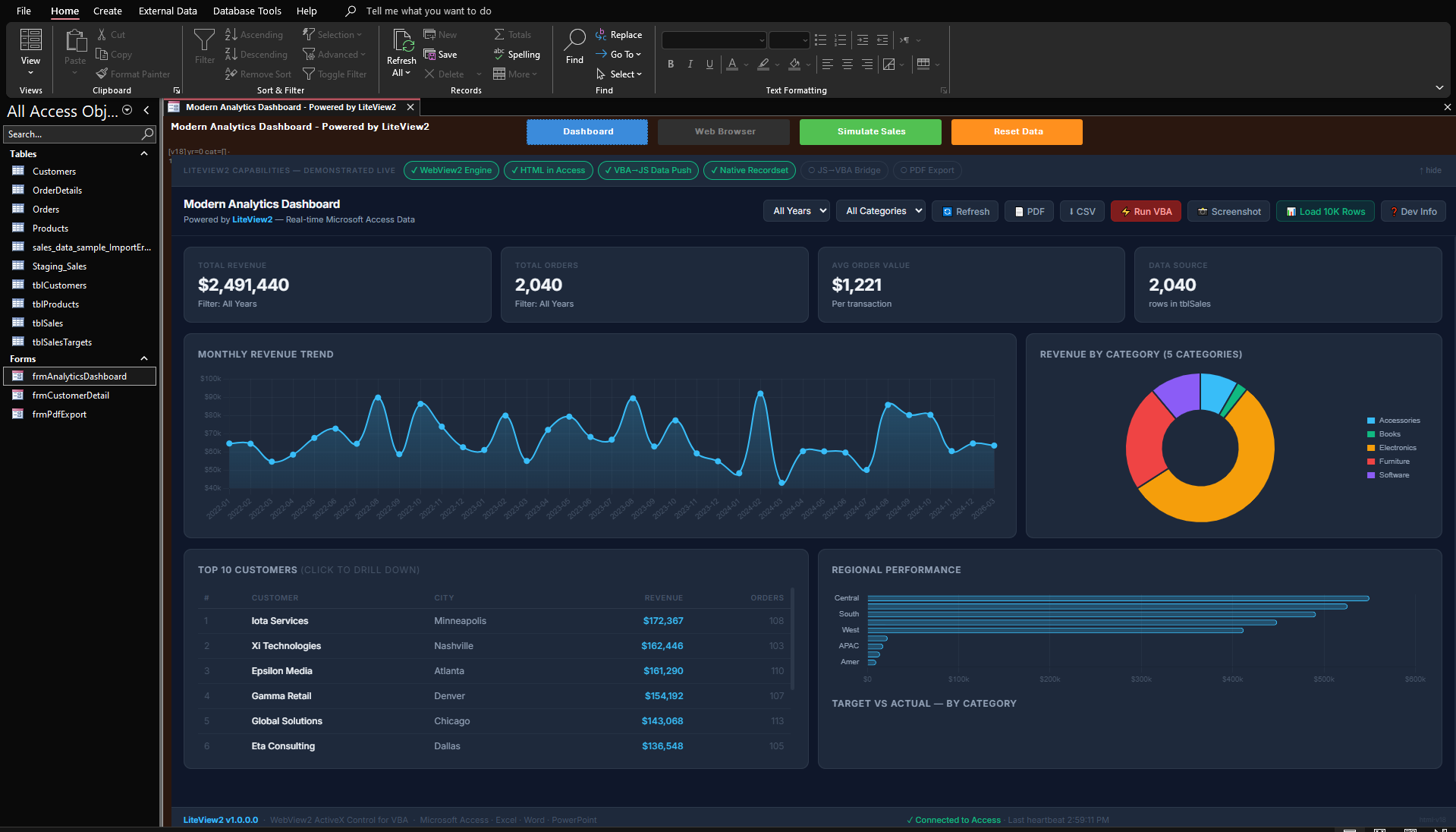
See LiteView2 in Action
A real Access form running a Chromium dashboard — powered by LiteView2.
Why Not Just Use The Microsoft Edge Browser Control?
The Microsoft Edge Browser Control proves that WebView2 can run inside VBA. LiteView2 focuses on what comes next:
Instead of starting from a low-level browser surface, LiteView2 provides the tooling VBA developers need to build real applications.
Compare LiteView2 With Microsoft's Edge Browser Control →Everything You Need to Build With VBA
270+ documented methods, 59 events, a JSON engine, and reg-free deployment — built specifically for Access developers, Excel VBA developers, and VBA consultants who need to ship real applications.
Registration-Free Deployment
Copy the OCX next to your app and add a small bootstrap module. No regsvr32, no admin rights, no registry entries.
Full Chromium Engine (WebView2)
Every modern website works. Full HTML5, CSS3, ES6+ JavaScript. Active security updates from Microsoft.
VBA ↔ JavaScript Bridge
Call VBA from JavaScript. Control the DOM from VBA. Full two-way communication with PostMessage, callbacks, and host objects.
See it in action — tutorial + working demo →Built-in JSON Support
Parse, query, validate, and build JSON natively in VBA. No external libraries required.
Works in Excel & Access
Embed in UserForms, Access forms, VB6, Delphi — any COM host. Push DAO recordsets directly to charts.
60+ Events
Navigation, DOM, downloads, frames, audio, focus, authentication, permissions, process lifecycle — full control.
Start in Minutes — Not Hours
Initialize once, then control everything from VBA.
' Get the singleton pool and embed a browser in a Frame control
Dim lv As Object
Set lv = GetPool()
idx = lv.CreateInControl("https://example.com", Me.Frame1)

' Execute JavaScript and get the result back in VBA
Dim title As String
title = lv.ExecuteScript(idx, "document.title")
MsgBox "Page title: " & title
' Open a recordset from your Access database
Dim rs As DAO.Recordset
Set rs = CurrentDb.OpenRecordset("SELECT Period, Revenue FROM Sales")

' Send it to the browser — serialized as JSON, received by JavaScript
lv.PushRecordset idx, rs, "renderChart"
rs.Close
What VBA Developers Build With LiteView2
Any HTML5 component that runs in a browser can run inside Access forms and Excel UserForms.
Replace the Legacy IE WebBrowser Control
Upgrade to a modern Chromium browser inside your Access and Excel applications. Full DOM access, 59 events, and the same VBA integration pattern — but with CSS, JavaScript, and modern web standards that actually work.
TinyMCE Rich Text Editors in Access Forms
Embed TinyMCE or Quill into an Access form. Read formatted HTML content back in VBA with one method call. Customer notes, CRM descriptions, email composition — all with a real text editor.
Chart.js and AG Grid Dashboards
Push DAO recordset or Excel range data directly to Chart.js charts and AG Grid data tables. No file exports, no middleware — data goes from VBA to the page in one call.
PDF Viewers, Maps, and AI Interfaces
Display PDFs inline with PDF.js. Embed Leaflet maps with address data from Access tables. Host AI chat interfaces powered by your existing VBA data context.
How Deployment Works
Copy LiteView2 files with your project
Place the OCX next to your .accdb or .xlsm file.
Add the bootstrap module
A small VBA module activates the OCX for registration-free use.
Run inside Excel or Access
Create browsers, navigate, execute JavaScript — all from VBA.
No installation. No admin rights required.
Download LiteView2 and Modernize Your VBA Apps in 5 Minutes
Full trial package. 30 days. All features. No credit card.
No credit card required · 3.7 MB · Works on Windows 10/11
Need implementation help — TinyMCE, AG Grid, Chart.js, or a custom integration?
Professional integration services for Access and Excel VBA →Built for performance and stability — not a wrapper or shim. Every method is a production-grade implementation with full error handling, designed specifically for VBA developers.
Created by Muhammad Imran — a developer who builds production Access and Excel applications for enterprise clients and needed a real WebView2 control that didn't exist.
The Only WebView2 ActiveX OCX Control Built for VBA Developers
IE WebBrowser vs Access 365 Edge Browser Control (Microsoft) vs LiteView2
Microsoft's built-in Edge Browser Control solves rendering. LiteView2 solves development. See the dedicated comparison page with citations to Microsoft's own documentation.
| Feature | IE WebBrowser | Access 365 Edge Browser Control (Microsoft) | LiteView2 |
|---|---|---|---|
| Modern HTML5 & CSS3 | ✗ | ✓ | ✓ |
| Browser methods (VBA) | Many (via .Object) | 4 only | 450+ |
| Browser events (VBA) | Many | 1 only | 59 |
| DOM access from VBA | ✓ MSHTML | ✗ | ✓ 28 helpers |
| JS → VBA communication | ✗ | ✗ no WebMessage | ✓ |
| JS return values / callbacks | Limited | ✗ fire-and-forget | ✓ |
| Navigation lifecycle hooks | ✗ | ✗ | ✓ |
| Network & request interception | ✗ | ✗ | ✓ |
| DevTools / CDP access | ✗ | ✗ | ✓ |
| Built-in JSON engine | ✗ | ✗ | ✓ |
| Download management | ✗ | ✗ | ✓ |
| PrintToPdf | ✗ | ✗ | ✓ |
| Screenshot capture | ✗ | ✗ | ✓ |
| Multi-browser instances | ✗ | ✗ | ✓ |
| Profile / session isolation | ✗ | ✗ | ✓ |
| Cookie & cache control | ✓ | ✗ | ✓ |
| Proxy support | Limited | ✗ | ✓ |
| Works in Excel / Word / VB6 | ✓ | ✗ Access-only | ✓ |
| Registration-free deployment | ✗ | ✗ | ✓ |
| Trusted Domains whitelist required | No | ✗ Yes | No (optional) |
| Requires MS365 | No | Yes — locked in | No |
| Active development | ✗ dead | Minimal | ✓ |
| Practical usability | Full (legacy web) | Severely limited | Full |
Get Started in 3 Steps
No installers. No configuration files. No registry entries.
Copy OCX to your folder
Place the OCX file next to your .accdb or .xlsm. That's the entire install.
Add the bootstrap module
Paste a small standard module (included below). It activates the control from VBA.
Load any website
Create a browser in any Frame control. Navigate, execute JavaScript, and handle events from VBA.
lv.CreateInControl "https://example.com", Me.Frame1
Full Bootstrap Module
Copy this standard module once per project — it handles all RegFree initialization.
' --- LiteView2 Reg-Free Bootstrap ---
' OCX must be in the same folder as your .accdb / .xlsm

#If Win64 Then
    Private Declare PtrSafe Function SetDllDirectory Lib "kernel32" _
        Alias "SetDllDirectoryW" (ByVal lpPathName As LongPtr) As Long
    Private Declare PtrSafe Function LiteView2_ActivateManifest _
        Lib "LiteView2_x64.ocx" (ByVal path As LongPtr) As Long
    Private Declare PtrSafe Function LiteView2_CreateBrowserPool _
        Lib "LiteView2_x64.ocx" () As Object
#Else
    Private Declare PtrSafe Function SetDllDirectory Lib "kernel32" _
        Alias "SetDllDirectoryW" (ByVal lpPathName As LongPtr) As Long
    Private Declare PtrSafe Function LiteView2_ActivateManifest _
        Lib "LiteView2_x86.ocx" (ByVal path As LongPtr) As Long
    Private Declare PtrSafe Function LiteView2_CreateBrowserPool _
        Lib "LiteView2_x86.ocx" () As Object
#End If

Private m_Pool As Object

Public Function GetPool() As Object
    If m_Pool Is Nothing Then
        Dim p As String
        p = CurrentProject.Path          ' Access  (Excel: ThisWorkbook.Path)
        SetDllDirectory StrPtr(p)       ' Tell Windows where the OCX lives
        #If Win64 Then
            LiteView2_ActivateManifest StrPtr(p & "\LiteView2_x64.ocx")
        #Else
            LiteView2_ActivateManifest StrPtr(p & "\LiteView2_x86.ocx")
        #End If
        Set m_Pool = LiteView2_CreateBrowserPool()
        m_Pool.ActivateLicense "Your Company", "YOUR-LICENSE-KEY"  ' omit this line during 30-day trial
    End If
    Set GetPool = m_Pool
End Function
Two Ways to Deploy. Zero Headaches.
Most VBA controls require admin rights and registry entries. LiteView2 works without either — but supports both models when you need them.
Registration-Free Mode
Drop the OCX file next to your application. No regsvr32,
no admin rights, no registry entries. Your app runs on any machine with the WebView2 Runtime.
How it works: Add a small bootstrap module (included above) that calls two functions from the OCX — one to set the folder path, one to activate the control. After that, create browsers and use them from any form. Everything is handled internally — no manual configuration needed.
- ✓ No COM registration required
- ✓ No administrator permissions needed
- ✓ XCopy / USB / network share deployment
- ✓ Multiple versions can coexist on one machine
- ✓ Perfect for consultants distributing to clients
Registered (COM) Mode
Standard COM registration using regsvr32.
Install once, use from any application on the machine. Early binding and IntelliSense in the VBA
editor.
- ✓ System-wide registration for all applications
- ✓ Full IntelliSense and early binding in VBA
- ✓ Centralized IT deployment via Group Policy
- ✓ Familiar workflow for Windows sysadmins
- ✓ Type library (.tlb) included for IDE support
Complete Feature Reference
A complete Chromium integration layer — not a wrapper, not a shim. Real APIs that do real work.
Navigation & Content
Load Any URL or HTML String
Navigate, NavigateSync, NavigateToString, history, custom HTTP requests with headers and POST data.
Read & Manipulate Web Pages From VBA
Read, write, click, check, select, scroll, focus — by ID, by name, by CSS selector. No JavaScript required.
Run JavaScript and Get Results Back
Sync and async JavaScript. Typed arguments. Return values. Persistent document-creation scripts.
Preview PDFs, Office Files & Media
Open images, PDFs, videos, audio, Word, Excel, and PowerPoint files directly in the browser frame.
Data & Communication
Two-Way VBA-to-JavaScript Bridge
PostMessage, WebMessageCallback, and Host Object Bridge. VBA ↔ JavaScript in both directions.
Tutorial + working demo →Send Database Records to Charts Directly
Serialize DAO or ADO recordsets directly to the browser. One call: VBA → JSON → JavaScript callback.
Parse & Build JSON Without External Libraries
Parse, query, validate, build JSON natively. No external VBA JSON library required.
Full Control Over Browser State
Get, set, and clear cookies. Clear cache, localStorage, IndexedDB, browsing history — individually or all.
Simple, Fair Pricing
One-time purchase. No subscriptions. No per-seat runtime fees. Royalty-free redistribution.
For individual developers shipping apps with embedded browsers.
- 1 named developer
- Unlimited applications
- Unlimited end users
- Royalty-free redistribution
- Both 32-bit and 64-bit OCX
- 1 year of updates
- Email support
For teams at a single office or department building multiple apps.
- Unlimited developers (one location)
- Unlimited applications
- Unlimited end users
- Royalty-free redistribution
- Both 32-bit and 64-bit OCX
- 1 year of updates
- Priority email support
For organizations with multiple offices or global development teams.
- Unlimited developers (all locations)
- Unlimited applications
- Unlimited end users
- Royalty-free redistribution
- Both 32-bit and 64-bit OCX
- 1 year of updates
- Priority support with SLA
Continue receiving updates and support after the first year.
- Software updates
- New feature releases
- Bug fixes and patches
- Continued email support
Try free for 30 days — full functionality, no credit card, no commitment.
Already evaluated LiteView2?
Ready to Purchase?
Developer license ($99 early-bird, standard $199) — instant checkout on Gumroad.
Site ($699) and Enterprise ($1299) — email for invoice within 1 business day.
Site or Enterprise? Email imran@imranosoft.com
What Early Adopters Are Saying
Representative feedback from early adopters during pilot phase.
“Couldn’t do anything useful with the Edge control. LiteView2 finally gave us proper DOM and JavaScript access in VBA.”
“Replaced the WebBrowser control in our Excel tool. Now we can actually interact with modern web pages from VBA.”
“The reg-free deployment made rollout simple. No installer issues, no admin permissions needed.”
Frequently Asked Questions
The control displays a watermark after 30 days. To activate, add a single line of VBA — .ActivateLicense "Your Company", "YOUR-LICENSE-KEY" — on either the pool object (reg-free) or the control reference (registered mode). Your code and projects remain intact — just add the key and you're back in business.
Yes. Contact us and we'll credit your Developer license purchase toward the Site or Enterprise license price.
You can distribute the LiteView2 OCX with your applications to unlimited end users without paying per-copy fees. The license covers the developer, not the deployment.
Yes, but it's already installed on Windows 10 (April 2018+) and Windows 11 by default. For older systems, Microsoft provides a free redistributable installer.
Technical Notes & Requirements
- Requires Microsoft WebView2 Runtime on Windows 10 (1809+) or newer
- Designed for VBA/VB6 hosts and not intended as a VBScript replacement
- Office 2007 and older versions are not supported
✅ Enterprise-Safe. Fully Compliant.
No telemetry. No phone-home. Offline licensing. No data collection. Built on Microsoft's official WebView2 runtime. Safe for regulated industries.
Every License Includes
Everything you need to go from download to production.